
Virtual DOM Explained in React
When we start learning JavaScript, we often come across a concept known as DOM (Document Object Model). We know that browsers use the DOM to render content on the screen.
But let me ask you a question?
If you had to change something on the webpage, let's say colour of a button, would you destroy the entire DOM and rebuild it again from scratch?
Technically, you could. In fact, traditional web applications often worked in ways that caused large parts of the page to re-render frequently.
But think about how expensive that operation is.
Destroying and rebuilding DOM nodes is not cheap because the browser has to:
Recalculate styles
Recompute layout positions
Repaint pixels on the screen
Potentially trigger reflows for surrounding elements
For small hobby projects like a simple Todo app, this usually isn't a big problem.
But imagine large-scale applications like social media platforms or travel booking websites.
These applications handle:
Massive amounts of data
Complex UI state
Frequent user interactions
Real-time updates
Now imagine that during a user's booking flow, the browser decides to repaint the entire UI just because a small piece of state changed.
That would create a terrible user experience and would also be extremely expensive for the browser.
This is exactly why modern JavaScript frameworks like React introduced the concept of the Virtual DOM.
What is Virtual DOM
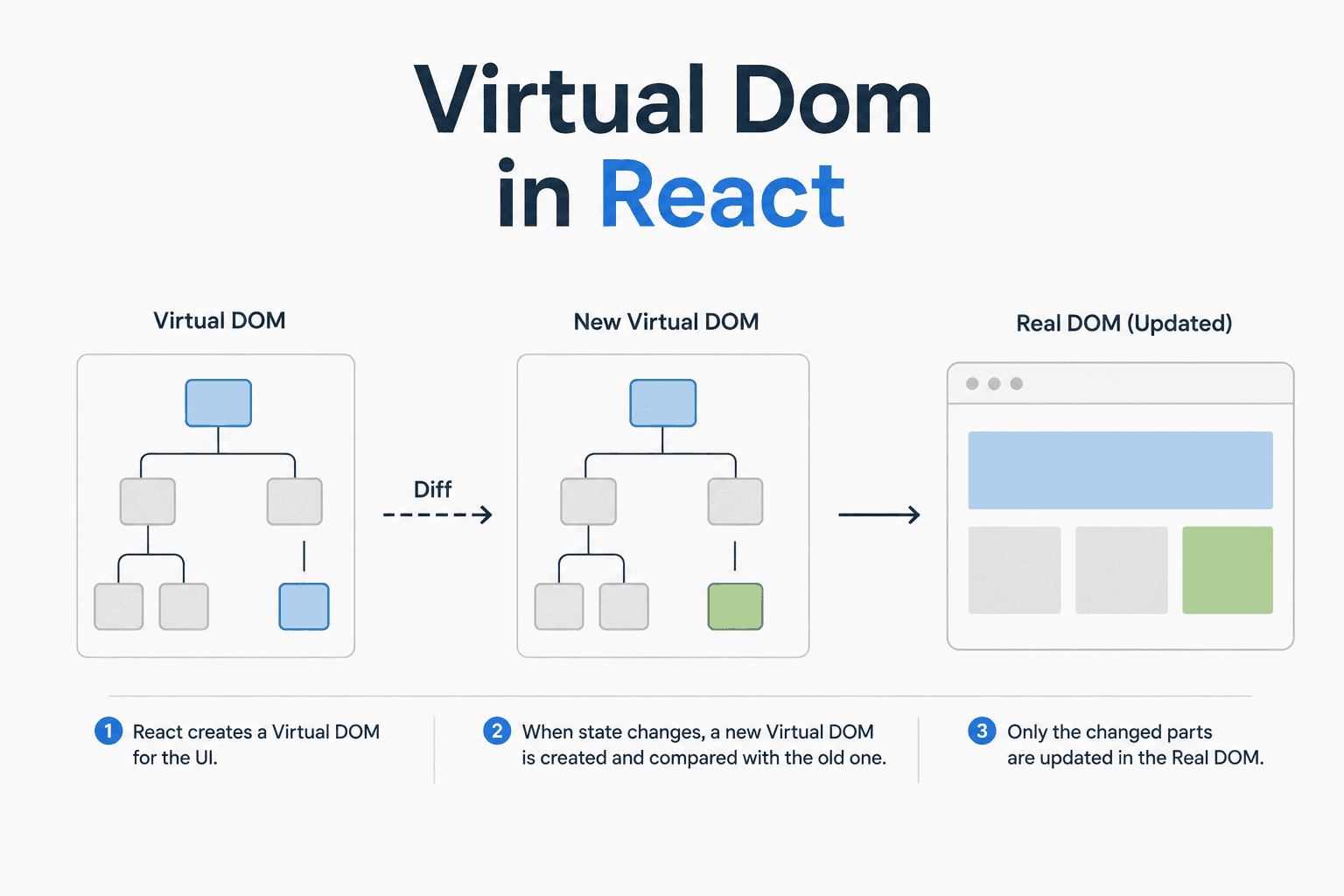
Virtual DOM is a lightweight, in-memory representation of the Actual DOM elements. It is a JavaScript representation of the Actual DOM structure.
In simpler words, it's the copy of the Actual DOM.

In the above diagram, you can clearly see that both the Real and Virtual DOM have:
Similar Structure
Similar child and parent hierarchy
Similar Relationships
However, the major difference is:
Real DOM → Actual browser nodes rendered on the screen
Virtual DOM → Plain JavaScript objects stored in memory
Since the Virtual DOM exists only in memory, it is much faster to create, compare, and update than manipulating the actual browser DOM directly.
Why Virtual DOM is used by React?
Since updating the Real DOM is expensive, React first performs updates on the Virtual DOM instead of directly manipulating the Actual DOM.
But wait…
Does React use the Virtual DOM to recreate the entire Real DOM again?
No! That would defeat the entire purpose of the Virtual DOM and would bring back the same performance problem.
Instead of repainting the entire UI, React compares the old Virtual DOM with the newly created Virtual DOM after the state changes.
This may sound confusing at first, so let's understand it with an analogy.
Analogy
Think of it this way. You have a blue print of your house. Now you need to move the table from left side to right side of the kitchen. Will you destroy the entire house, just to change the position of the table?

Of Course Not!
You will look in the blueprint, the position of the table currently and how it will look after the change and then you just move the table.
That's exactly what React does with the help of Virtual DOM. It computes the changes between old and new Virtual DOM and only applies the changes to the Actual DOM.

React compares the old Virtual DOM with the new Virtual DOM, calculates the differences, and applies only the necessary updates to the Real DOM.
This significantly reduces unnecessary DOM operations and improves application performance.
So now that we know about the Virtual DOM, let's see how the entire process works under the hood!
Step by Step working of Virtual DOM
1. Initial Render Phase

Initial Render phase occurs when the React Components mounts for the first time on the Browser Screen.
In this process, React executes the component functions, creates the Virtual DOM tree, and then generates the Actual DOM nodes that are rendered by the browser.
Once the Actual DOM is created, the browser screen is rendered.
2. State/Props Update Phase

In this phase, there would be an update in the old Virtual DOM.
Let's say that the content loaded from the external API and is now ready to be rendered on the screen.
React re-executes the component function, processes the updated state/props, and creates a new Virtual DOM tree.
Now we have two virtual DOM trees:
Old Tree: This is the old virtual DOM that represents previous state.
New Tree: This is new virtual DOM that represents updated state.
3. Diffing Phase

Diffing is the phase, where the old and new virtual DOM are compared to find the minimal DOM changes.
This process would return a list of mutations/patches that needs to be applied to the DOM.
Once these changes are computed, then happens the Re-Render Phase.
4. Re-Render Phase
In the Re Rendering phase, the changes returned after the diffing phase is used to apply changes to the existing Actual DOM and hence update the browser screen with the new changes.
Hence, this was step by step working of the Virtual DOM in React.
Is Actual DOM Slow?
While going through the article, you might have felt somewhere that, is browser's DOM slow? Is it slower than the Virtual DOM?
Well, the answer is NO!
Actual DOM is not slower than the Virtual DOM. It's just that unnecessary changes in the DOM causing constant re-renders can cause a lot of lag and performance issues on the browser.
In reality, the expensive part is unnecessary DOM manipulation, layout recalculations, and browser repainting.
React improves performance by minimising those operations through diffing and selective updates.
Conclusion
Now you know why React needed the Virtual DOM instead of constantly tinkering with the Actual DOM directly.
You also saw how mounting works, how state updates create a new Virtual DOM tree, how diffing happens, and how React updates only the necessary parts of the DOM instead of repainting the entire screen.
And honestly, once you understand this process, you start looking at React very differently.
Now what are you waiting for?
Go build that React app and you'll never see rendering the same way again.